
Validate Before
You Invest
Size your fleet, test traffic scenarios, and detect bottlenecks with high-precision simulation — no coding required.
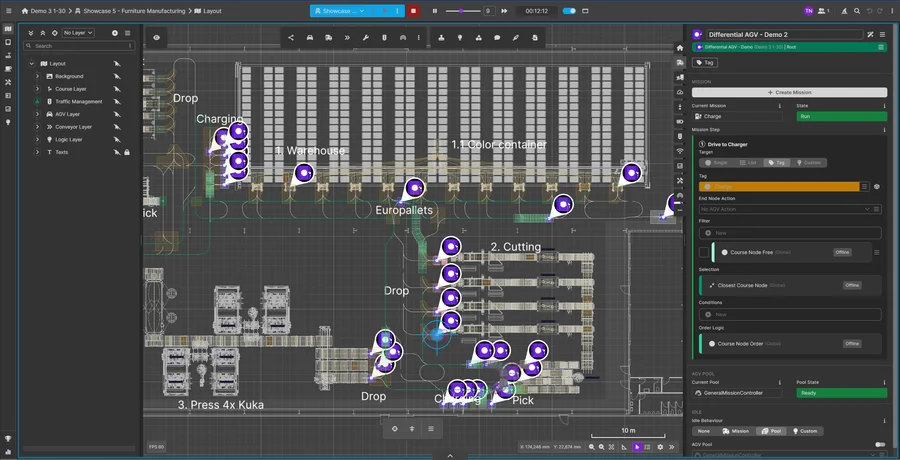
Questions the simulation answers
How many AMR/AGV do we need to hit this throughput target?
Which layout variant is more robust under peak load?
Where do bottlenecks and queue times appear?
How do battery swaps and charging cycles affect throughput?
How does the fleet behave under different order-priority schemes?
Is this AMR/AGV investment worth it — and from when does it pay off?
Simulation
Validate your logistics concept before commissioning. Size your fleet, test traffic scenarios, and detect bottlenecks with high-precision simulation — no coding required.
Simulation Engine
High-precision engine for fleet behavior and throughput analysis.
- Fleet sizing & dimensioning
- Real-time debug views
- Multi-scenario comparison
- Adjustable simulation speed
- Battery & charging simulation
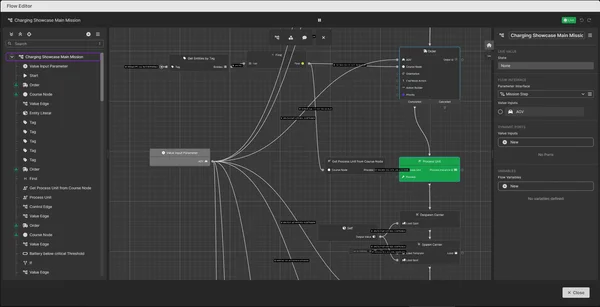
Low-Code Flow Editor No-Code
Define transport processes visually. No coding required.
- Drag-and-drop flow builder
- Nested flows for complex processes
- Reusable process templates
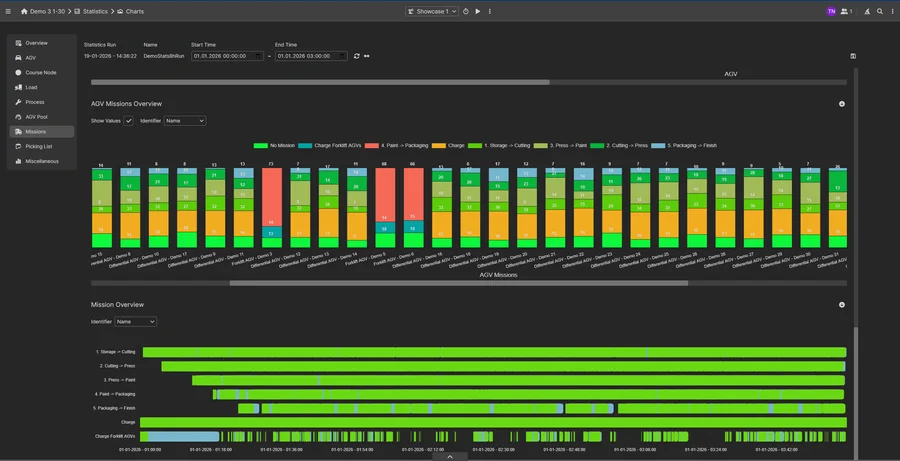
Statistics & Analysis
Comprehensive statistical analysis for data-driven planning decisions.
- Bottleneck detection & throughput analysis
- Robot utilization & custom KPIs
- CSV statistics export for decision-makers
More Simulation Features
From Layout to a Defensible Answer
Simulation builds directly on your layout and takes you through four steps to a validated answer on fleet size, throughput, and bottlenecks — with no separate modeling tool required.
Import the layout
The layout you built in the Editor — or imported as LIF — with stations, travel paths, charging zones, and handover points becomes the basis of the simulation model, so there's no separate modeling step.
Configure fleet & orders
Set vehicle types, fleet size, speeds, and battery behavior. Define transport orders, order volumes, and prioritization rules visually in the low-code flow editor.
Run the simulation
The scenario runs at an adjustable speed; the real-time debug view shows vehicle behavior, routing conflicts, and queue times. Layout variants can be tested against each other in parallel.
Analyze the results
Review throughput, robot utilization, bottlenecks, and custom KPIs, export them as CSV, and share them with stakeholders — a defensible basis for the decision before you invest.
FAQ
What exactly does FleetEngine Simulation simulate?
Do I need programming skills?
What results do I get from the simulation?
How is FleetEngine Simulation different from FlexSim or Plant Simulation?
Can I do hardware-in-the-loop testing?
Try FleetEngine Simulation
Start a 30-day free trial or schedule a personal demo.