
Real-Time Monitoring
& Fleet Overview
Observe and analyze your fleet in real-time. Track vehicle positions, order status, and battery levels on your facility layout — with full VDA 5050 protocol transparency. FleetEngine doesn't control the vehicles; it makes visible what is actually happening on the floor.
Questions Visualization answers
Where is each vehicle right now, and what is it doing?
Which VDA 5050 messages are being exchanged between master control and the vehicles?
Why is an order stuck, or a vehicle blocked?
How do different vehicle vendors behave within the same fleet?
Where do recurring wait times or bottlenecks occur during live operation?
How does actual utilization compare to the plan?
Real-Time Fleet Overview
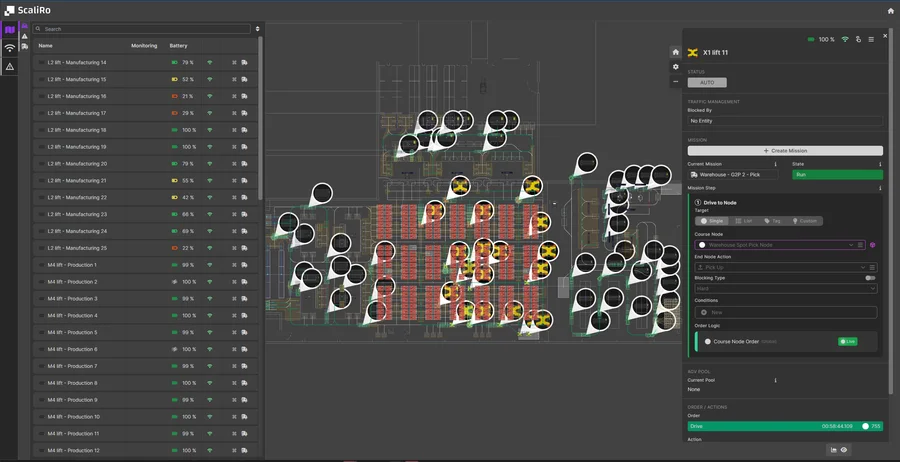
See at a glance where every robot is, what order it's executing, and whether any warnings or errors are present. FleetEngine displays all VDA 5050 messages live on your facility layout — as a pure observation and analysis layer above your master control.
Live Fleet & Infrastructure Overview
Complete operational picture at a glance — robots, infrastructure, and fleet status in one view.
- Real-time 2D visualization of all mobile robots
- Gates, sensors, and machine positions
- VDA 5050 warnings, errors & battery tracking
- Order status per robot
VDA 5050 Message Monitoring
Follow the complete message flow between master control and vehicles — order, state, visualization, connection, and instantActions. See exactly what's being sent and received, without intervening in the communication yourself.
- Raw protocol messages in a readable view
- Timeline per vehicle and per order
- Filterable by vehicle, message type, or time range
Multi-Vendor Fleet Analysis
Heterogeneous fleets from multiple vendors in a single, vendor-independent view. FleetEngine normalizes VDA 5050 and LIF data so you can compare vehicles from different manufacturers directly.
- Consistent view regardless of vendor
- Compare utilization, error rates, and throughput by vendor
- Foundation for vendor migration and fleet expansion
Debug Integration Issues
When integrating new vehicles or master control systems, the debug view immediately shows where VDA 5050 communication deviates — missing state fields, delayed messages, or inconsistent order data.
- Detect blocked or stuck orders
- Traceable error and warning history
Dashboards, Reports & Replay
Customizable dashboards summarize fleet KPIs for operations and management. Historical replay plays back past time ranges — for post-incident analysis of disruptions or capacity bottlenecks.
- Configurable KPI dashboards
- Historical replay of past operating periods
FAQ
Does the visualization intervene in vehicle control?
Does it work with fleets from different vendors?
Can I trace past events?
What data feeds into dashboards and reports?
How does Visualization help when integrating new vehicles?
Experience FleetEngine Visualization Live
See how you can monitor your fleet in real-time. Schedule a demo.